


0:00 / 0:00
WYSIWYG editing
Click any text or image on the rendered page and change it there. What you see while editing is exactly what ships.
We use Google Analytics to understand how visitors use this site. It only runs if you accept, and you can change your choice at any time via "Cookie settings" in the footer. Details are in our privacy policy.
Experience Parhelia
Visual editing, AI agents for the repetitive work, and reviews anyone can join - installed as a module on your existing Sitecore.
Sitecore XM/XP · Sitecore AI
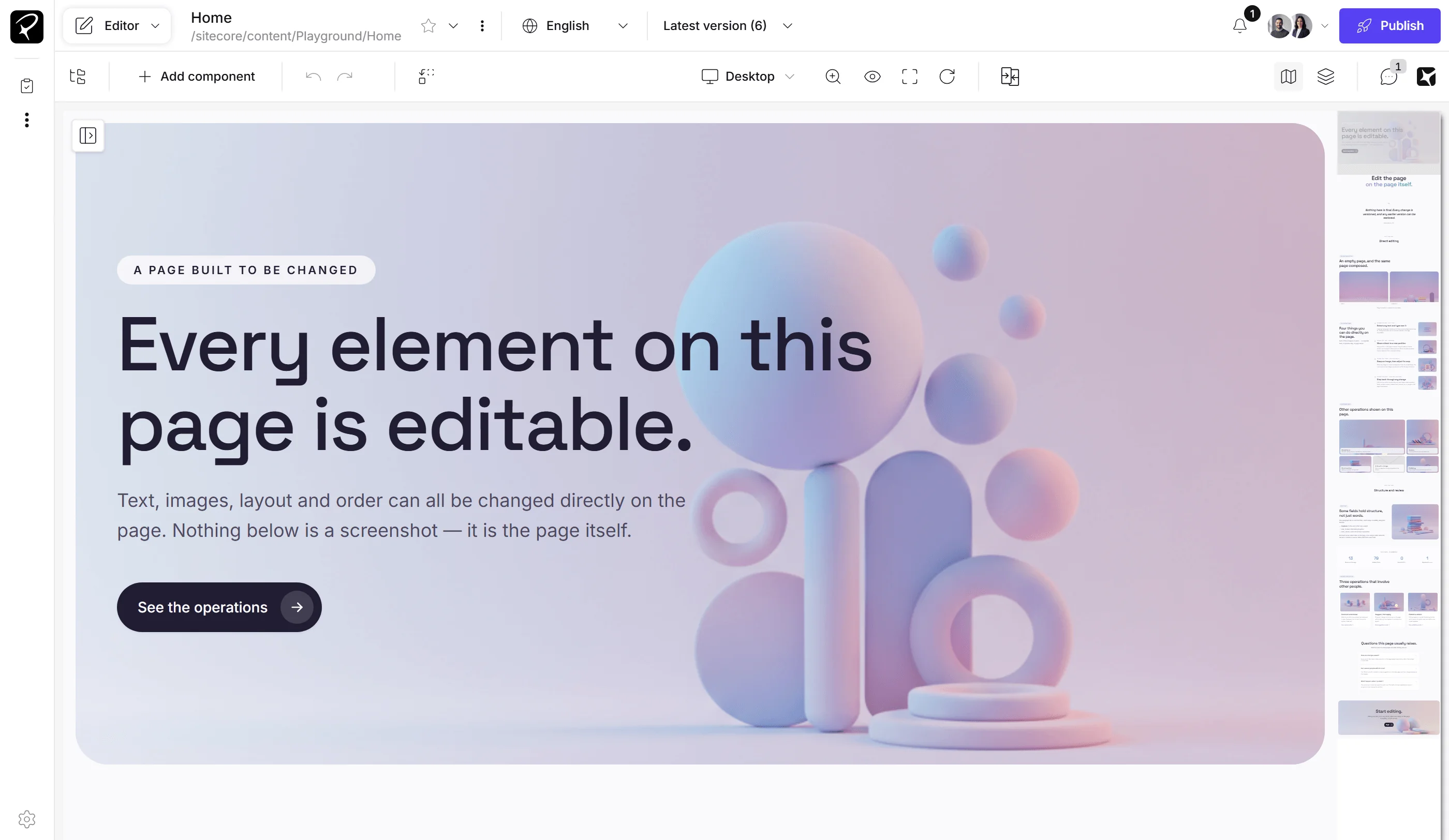
Guided tour
Step through the editor's features one at a time. Each step highlights the part of the screen it describes.
x 49.5% · y 49.5% · zoom 1×
Click any text and start typing — changes save as you write. Colleagues on the same page appear as live cursors while they edit beside you.
x 5.4% · y 9.1% · zoom 1×
Content tree, search and favorites — find any page in seconds and jump straight into it.
x 6.1% · y 16.1% · zoom 1×
Click any component to see its fields — or edit text right on the page, WYSIWYG. Every change is saved per field.
x 95.9% · y 50.6% · zoom 1×
The minimap tracks your viewport — one click jumps anywhere on the page.
x 13.5% · y 9.1% · zoom 1×
Insert and rearrange components with drag and drop directly on the rendered page.
x 97% · y 9.1% · zoom 1×
Feedback lives on the page — comments and suggested edits collect in one feed, ready to apply or reject.
x 98.6% · y 9.1% · zoom 1×
Ask for the work in your own words — an agent drafts, rewrites and restructures pages using the same tools you do. Every change is yours to approve.
x 85.6% · y 3% · zoom 1×
Get notified when pages are edited, and when someone mentions you or leaves feedback.
x 89% · y 3.1% · zoom 1×
See who is editing with you and collaborate on the same page in real time.
x 91.5% · y 9.1% · zoom 1×
See the page structure, select components and arrange the layout from one panel.
x 69.7% · y 9.1% · zoom 1×
Compare page states side by side without leaving the editing canvas.
Click the page, type, done. Visual editing that's fast, direct — and fun.
A module for XM, XP and XM Cloud — on-prem or cloud. No migration, no re-platforming and installation in 1 day.
BYOK: OpenAI, Anthropic, Microsoft Azure, OpenRouter or local models. You choose the providers, models and rules.
Comments, suggestions and approvals on the real page — reviewers just need a link.
01 Visual editor / Edit the real page, in place
The page you edit is the page your visitors see. Six capabilities make that work.
Click any text or image on the rendered page and change it there. What you see while editing is exactly what ships.
Move components on the page and compose new sections by dragging them where they belong. Live drop targets show where a block can land.
Select a sentence, describe the change and apply the suggestion in place — shorten, rephrase or rewrite without leaving the page.
Describe an image and generate it straight into the field — or edit, enhance, fix lighting, remove a background or upscale in one click.
See the page before and after your changes side by side with all changes highlighted. Publish when it looks right.
Every change is reversible. Step back and forward through your edits and review the history of any field.
Find any page, component or image by describing it. The search understands what your pictures show.
Editing, feedback and sign-off happen in one place — on the page itself.
Several editors work on the same site at once and see each other's changes as they happen.
Discuss a headline where it stands. Comments sit on the element they refer to and notify the people involved.
Propose a change instead of making it. Suggestions show up like tracked changes and are accepted or rejected in place.
Send a page to stakeholders for approval — including reviewers without a Sitecore login. They see the real page and leave their feedback on it.
parhelia agents work inside your site with over 100 tools — they read, create and change content, and you watch and control every step.
AI AGENT Use cases
These are just a few examples. You can also define your own agents, specialized for your specific processes.
Content creation
Campaign pages, landing variants and seasonal updates pile up faster than teams can build them.
parhelia agents draft pages with real editor tools — you watch every step, then review and approve.
SEO & GEO
Legacy content isn't structured for AI-powered search and answer engines.
parhelia agents audit and optimize for classic SEO and generative search, page by page — no manual rewrite project.
Migration
Migrations put years of content at risk of loss, duplication and inconsistency.
Structured, agent-assisted migration preserves content integrity and quality.
Turn repeating jobs into workflows: define the goal, let agents work through the tasks, approve the results.
Translate and localize entire page libraries with AI that keeps context, cultural nuance and your brand voice intact.
A standard Sitecore install for XM/XP 10.3, 10.4, 10.5 or XM Cloud. No migration needed.
The Setup Wizard takes your OpenAI, Anthropic, Microsoft Azure, Open Router keys — your account, your models.
30 days, full features, self-service. Your team edits the same afternoon.
CONTACT US
Talk to us about what parhelia can do for your content team
Transform your content operations with us.
Business & solution manager
Business & solution manager
Get access to a ready-to-use sandbox and explore the editor, AI workflows, and review experience at your own pace.


